Changelog

Stay updated with the latest features, improvements, and fixes in SparrowDesk.

March 31, 2026

AI Agent Actions
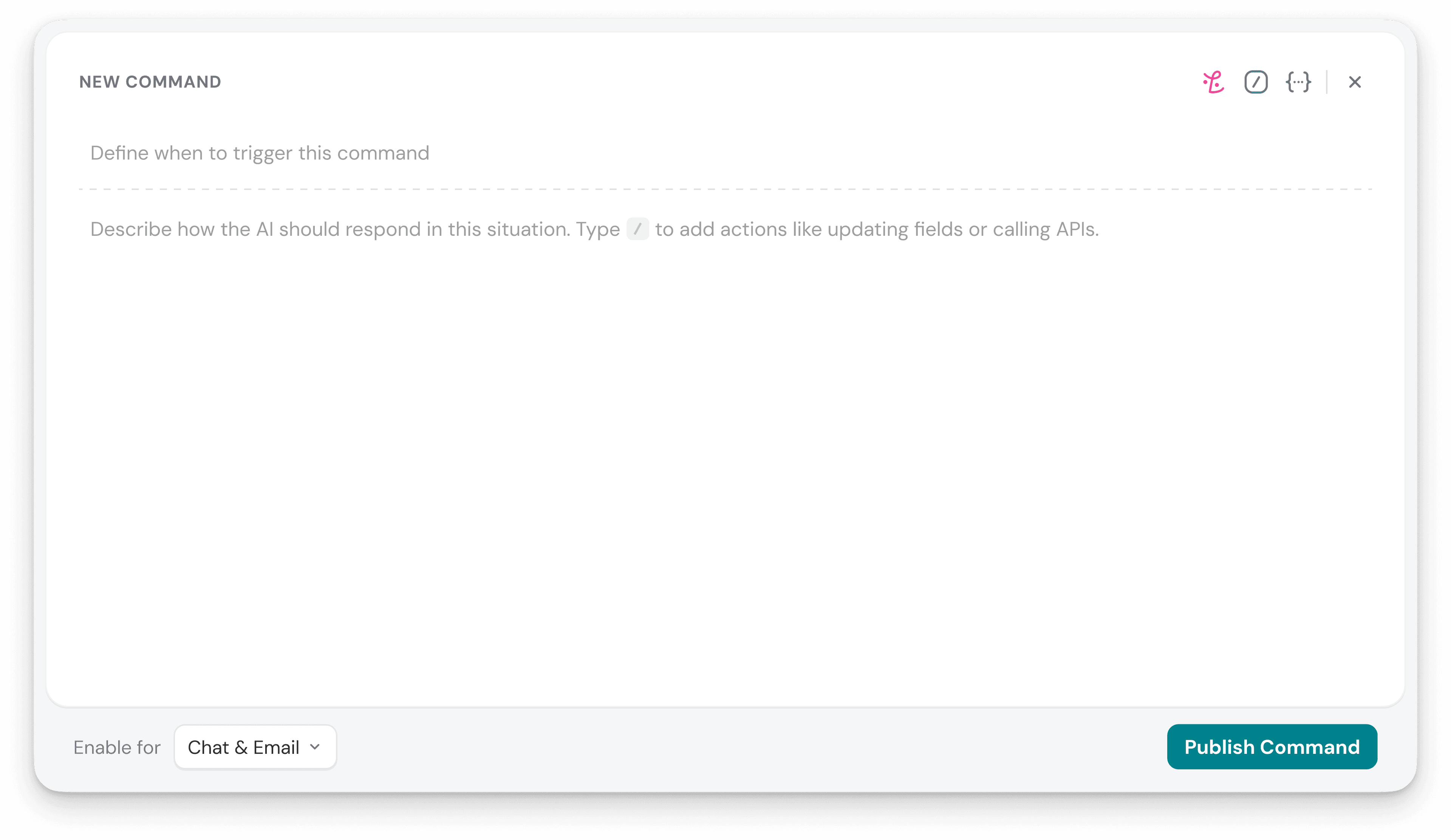
AI Agent Actions


Now , AI agents can do more than answering questions.


With AI Actions, they can collect the right details, validate inputs, call external APIs, update customer data, and take the next step based on the response — all within the same conversation.


Use this to handle support scenarios like checking availability, confirming delivery, updating properties, and triggering follow-up actions across the 3rd party tools your team already uses.


Along with this ,


Jira and Linear integration - Customer issues often begin in support and continue in engineering. Use Jira and Linear integrations with SparrowDesk, to create and link issues from conversations, keep support closer to engineering progress, and track follow-up work more clearly.


For a more in-depth guide on AI Agent Actions , watch the walkthrough:


Improvements

Improved the email verification onboarding screen to make it more clear and direct.


Added support to push account and user data to Vitally, making it easier to keep customer data aligned across systems.

Fixes

Fixed First response SLA getting breached after it had already been achieved when conversation priority changed.


Fixed the watchers component breaking when live chat conversations were present.


Fixed macros sending replies when the requestor had been deleted.


Fixed AI tickets not appearing under Watching when agents added themselves as watchers.


Fixed image selection not working when clicking in the attached image area.


Fixed the action block and lifecycle breaking when saving field updates using Save changes instead of the tick.
March 20, 2026

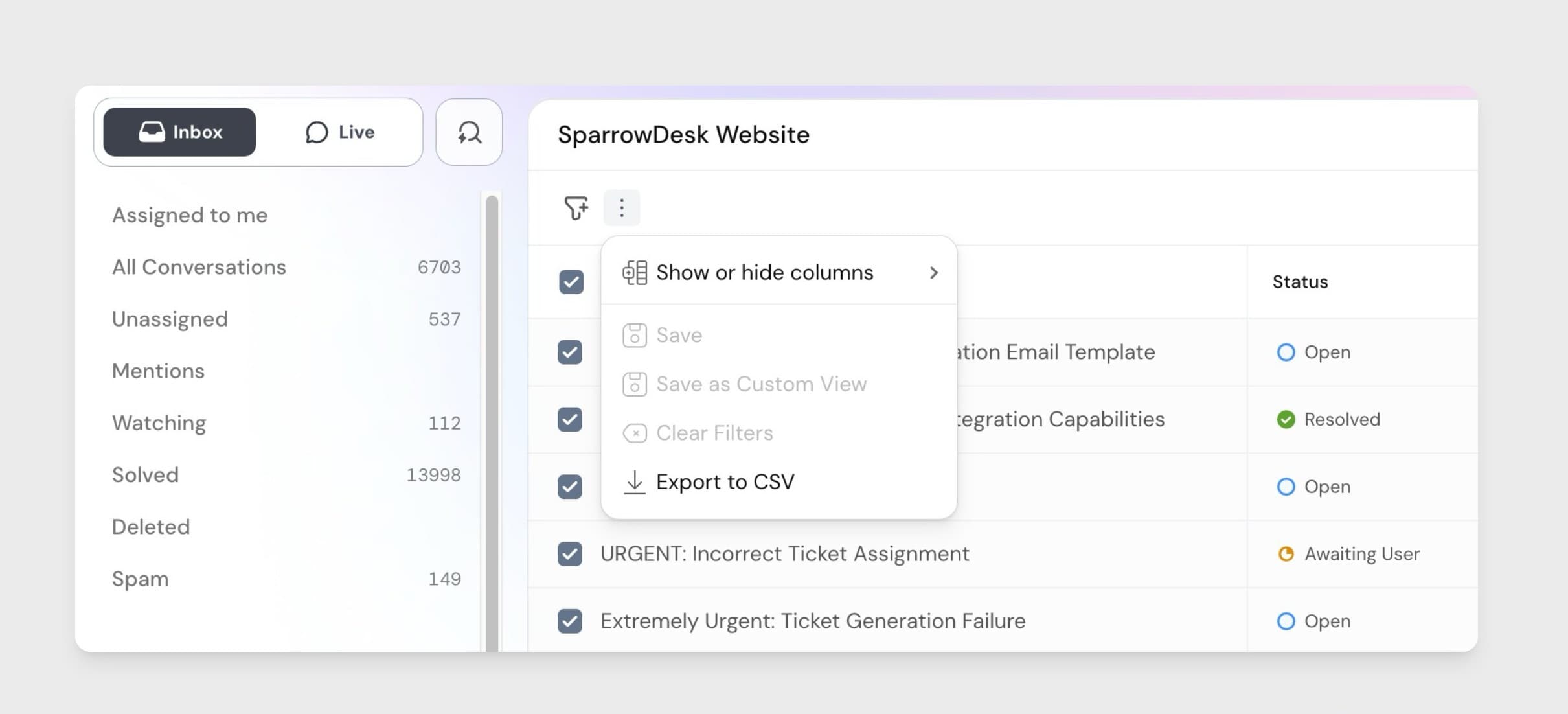
Export conversations as CSV

Export conversations as CSV

You can now export conversations as CSV, making it easier to work with support data outside SparrowDesk.


Use this to analyze support trends, share records with other teams, or keep conversation data ready for audits and reporting.


Along with this ,


Add Tables to your support articles - You can now add tables in the support articles to organize information in a clearer, more structured way.

Improvements

In Article Editor you can change inline text block types, apply text colors, resize and manage images more easily.


HTTP Request payloads in Workflow , now support all field types, so external systems receive more complete conversation, contact, and chat data across supported workflow actions.

Fixes

Fixed workflows getting stuck in an assignment loop when team and agent assignment started from an unassigned state


Fixed standalone search not returning results correctly from the Solved view


Fixed standalone search using quoted reply text as search context


Fixed requestor details getting stuck in a loading state when fields were updated in a conversation


Fixed chat widget visibility conditions resetting after navigation


Fixed deleting content in the HTTP text area inside Canvas not working as expected


Fixed placeholder variables not being clickable when adding variables


Fixed Live Chat agent and team assignment workflows not triggering


Fixed updating workflow fields for unassigned chats not working as expected


Fixed help center checkboxes rendering as bullet points


Fixed workflow names not showing properly in the activity log


March 14, 2026

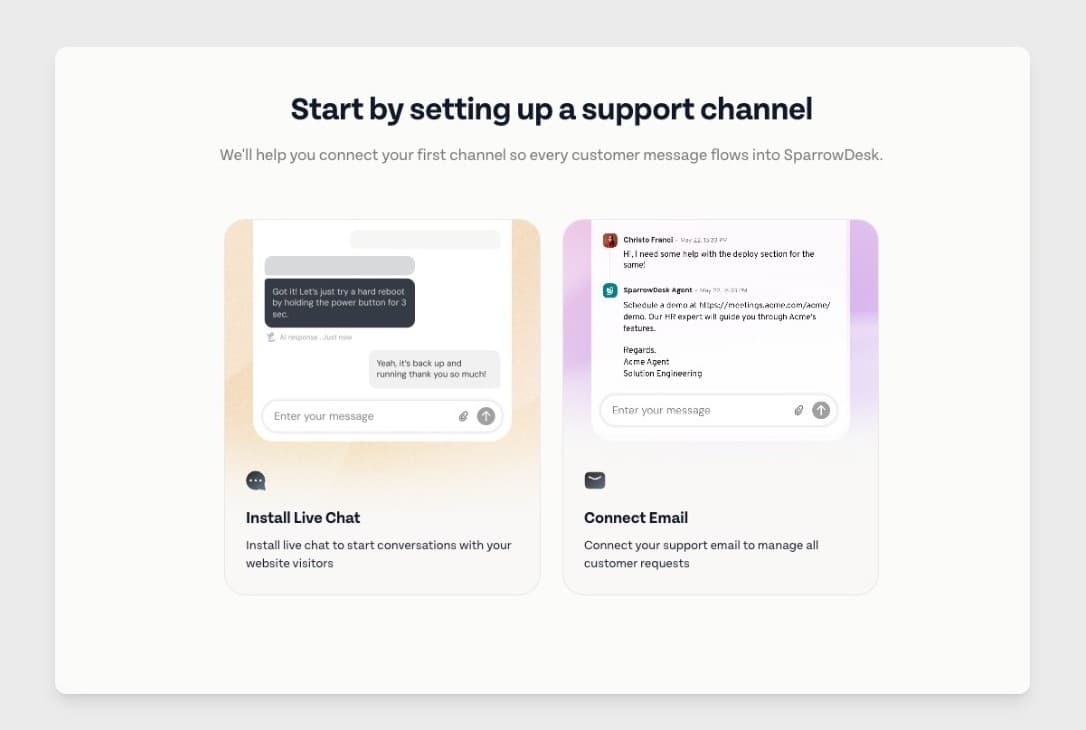
Guided Onboarding

Guided Onboarding

Getting started with most support tools means figuring out the platform step by step.


Guided onboarding brings the key setup into one clear flow and a checklist, making it easier for support teams to set up faster and start handling conversations sooner.


Along with this ,


Add notes even when AI is replying - Agents can now add internal notes even while AI is handling a conversation, making it easier to collaborate without interrupting the AI workflow.


Advanced Search page - You can now search for conversations using an advanced search page for a more powerful searches. This makes it easier to find the right conversation without relying only on filters.

Improvements

Added collision detection, so agents can see when someone else is replying and avoid sending overlapping responses.


Added Italian language support, so teams can use SparrowDesk in their preferred language.


Added Slack alerts for email delivery failures, so teams can catch and act on sending issues faster.


Upgraded inbox indexing with OpenSearch V2 to support a more reliable and scalable search experience.


Improved watcher UI interactions to make them more consistent and easier to use.


Fixes

Fixed mentions in internal notes for AI-handled conversations so handed-over tickets now appear correctly in mention view


Fixed issues when adding more than three conditions in a condition block


Fixed inline chat attachments sent through watcher notifications


Fixed single-line conversation fields not updating after text is entered


Fixed First Response Time being achieved for chat conversations via internal notes


Fixed the chat widget limit toggle still appearing on the chat widget page


Fixed contacts UI and search inconsistencies


Fixed search with hyphens not working in merged conversations and inbox filters


Fixed image preview mismatches when images are added on the same line as text


Fixed duplicate ticket creation for OAuth sent-email tickets after merge

February 28, 2026

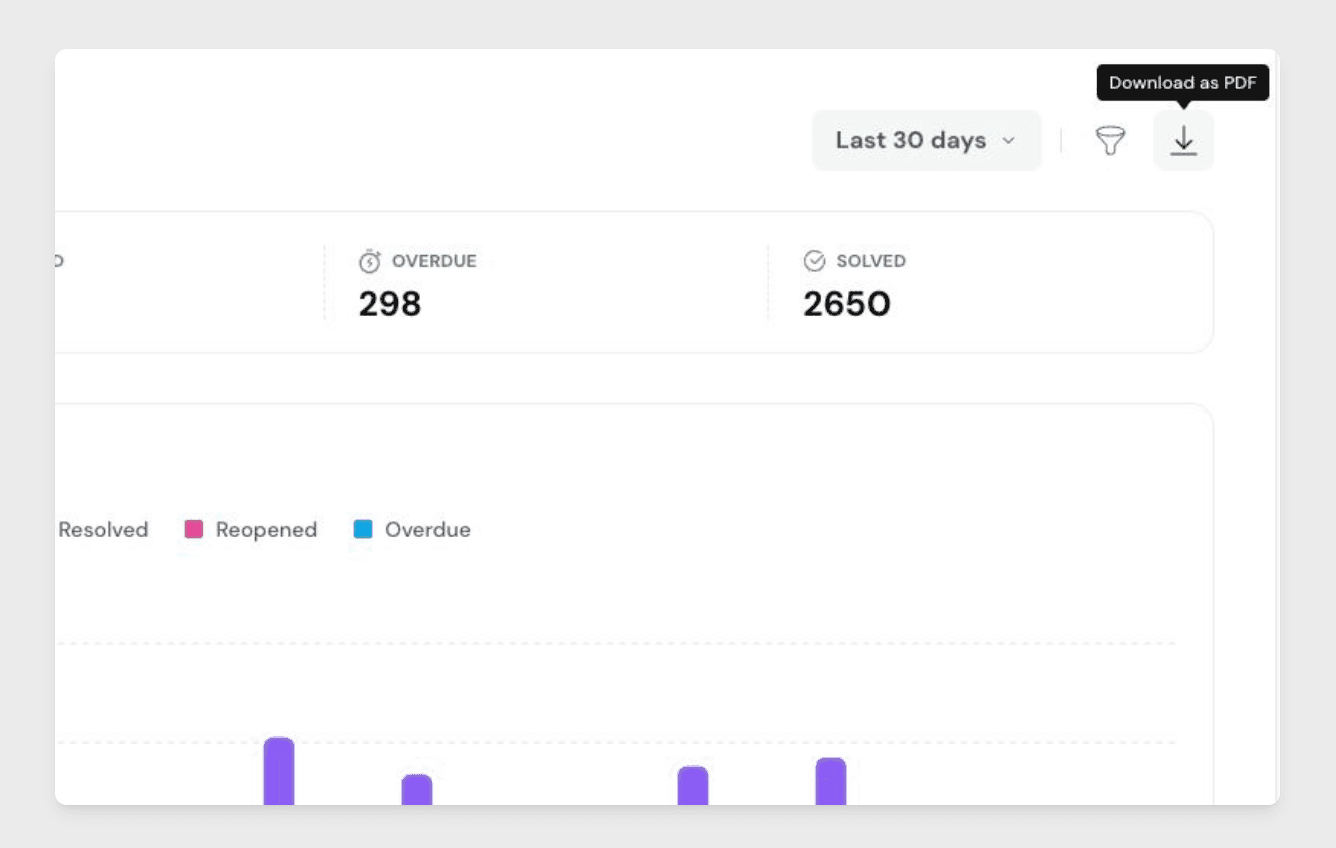
Download Reports as PDF

Download Reports as PDF

You can now download reports as PDF files, making it easier to save, share, and review report data outside SparrowDesk.


The exported file captures your current view, including applied filters.


Use this to share weekly performance updates with leadership, download SLA reports for audits and reviews, or save report snapshots for internal reporting.


Along with this ,


Reports for CSAT - You can now track customer satisfaction with a dedicated CSAT report. Use it to review feedback trends, measure satisfaction over time, and understand how your team is performing.

Improvements

Optimized contact and ticket deletion to reduce delays and improve performance


Upgraded routing and asset loading for better application stability


Removed email notifications for self status changes

Fixes

Fixed report filters and custom date ranges showing incorrect or missing dates


Fixed report charts showing inaccurate dates or incomplete data in some views


Fixed drill-down issues in reports when switching views or navigating across modules


Fixed filters like Team, Merge, and Requested By not working correctly in reports


Fixed CSAT not triggering when live chats were closed using macros


Fixed image previews not appearing for some customer attachments


Fixed an issue where previously uploaded content could be attached to a new conversation

February 20, 2026

AI Classification in workflows

ai-classification-in-workflows

Bring AI-powered decisioning into workflow automation.

AI Classification introduces an AI-native workflow action that replaces complex keyword-based if/else logic with structured, deterministic classification. Admins can define a short prompt and a fixed set of buckets, allowing AI to always select exactly one predefined outcome and drive workflow branching with semantic context.

This action can be triggered on new conversations or incoming messages, reads the latest inbound message, and routes workflows based on intent, sentiment, language, or other defined criteria. Classification is constrained to predefined buckets only, ensuring workflows remain predictable and never fail due to AI output.

Available on the Professional plan in v1.

Why this matters

  • More precise automation – Route conversations based on meaning, not just keywords.
  • Predictable outcomes – AI always resolves into predefined buckets for reliable workflow branching.
  • Reduced workflow complexity – Replace layered if/else rules with a single AI-powered decision step.
  • Scalable support operations – Handle nuanced routing, SLAs, and assignments with semantic understanding.

Features

Watchers for tickets

Keep the right people in the loop on every conversation.

Agents and managers can now watch tickets to stay informed on important updates. Any agent with access to a ticket can follow it, while managers and admins can add or remove watchers manually or through workflows to ensure the right stakeholders are included.

Watchers receive email notifications when key activity happens — including customer replies, agent responses, internal notes, and status changes — and can view all followed tickets in a dedicated Watching view within the inbox. Notifications are automatically suppressed for actions triggered by the watcher to avoid noise.

Admins can also add watchers automatically using workflow actions, making it easier to loop in creators, owners, or specific team members when a ticket is created.

Why this matters

  • Better visibility – Keep stakeholders informed without manual updates.
  • Faster collaboration – Ensure the right teams stay aligned on critical tickets.
  • Less noise – Receive updates only on conversations that matter.
  • Scalable workflows – Automatically add relevant watchers as tickets are created or updated.

Improvements

AI support for image attachments in conversations

AI can now process and analyze image attachments shared in email and chat. By understanding visual context alongside messages, the system can generate more accurate responses and improve overall conversation handling.

Fixes

  • Resolved a crash on the Roles page when accessing roles configured with ticket and form permissions.
  • Assignees now receive notifications when internal notes are added to their tickets.
  • SLA reminders are now correctly delivered to the requestor’s inbox.
  • Portal notification customization has been removed from the Notifications section, with updated permission labels and naming.
  • Minor UI improvements on the Email configuration page.
  • Articles created by deleted members now open without errors.
  • Zoona replies no longer appear as edited in AI Agent Improvements.
  • Eliminated unintended horizontal scrolling across affected pages.
  • Corrected preview naming inconsistency where Luna appeared instead of Zoona.