Changelog

Stay updated with the latest features, improvements, and fixes in SparrowDesk.

February 14, 2026

Publish Help Center articles as Unlisted
Publish-as-Unlisted

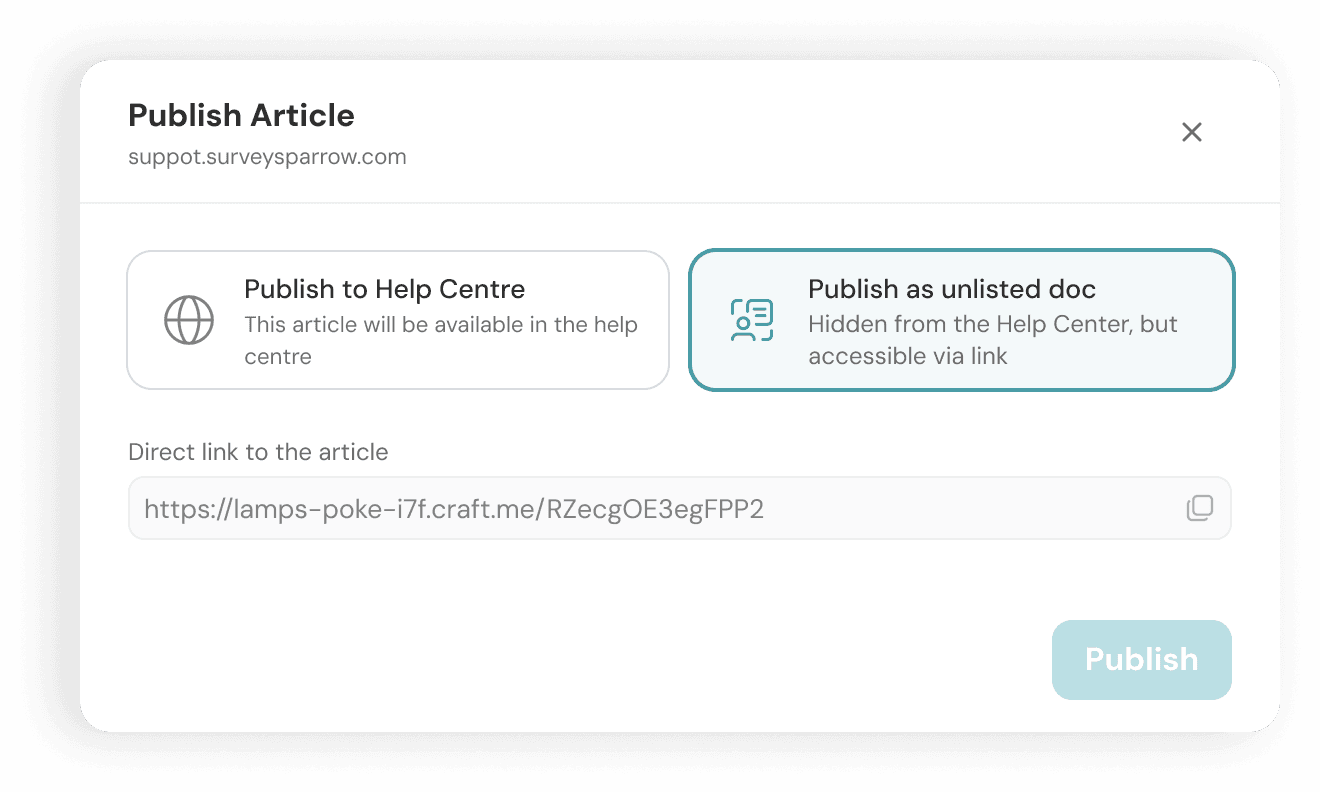
Help Center articles can now be published as Unlisted with a shareable preview links.Unlisted articles remain hidden from collections and public search, but anyone with the link can access and review them. This enables teams to collaborate on drafts, gather approvals, and share sensitive content without exposing it before publication.


Improvements

  • While writing Help Articles, authors can now link directly to specific sections within an article using anchor links and quickly connect to other Help Center articles while writing.

Fixes

  • Fixed an issue where newly added conversation dropdown options appeared duplicated after saving.
  • Restored password login visibility for account owners and admins when SSO is enforced on domain-specific login links.
  • Resolved inconsistencies affecting login functionality when SSO is enabled for an account.

API Changes

Added a public API to retrieve all tags in an account, enabling programmatic access to tag data for integrations, reporting, and automation.
October 13, 2025

Create workflows that trigger when multiple fields are updated in a conversation

multi-field-update-trigger

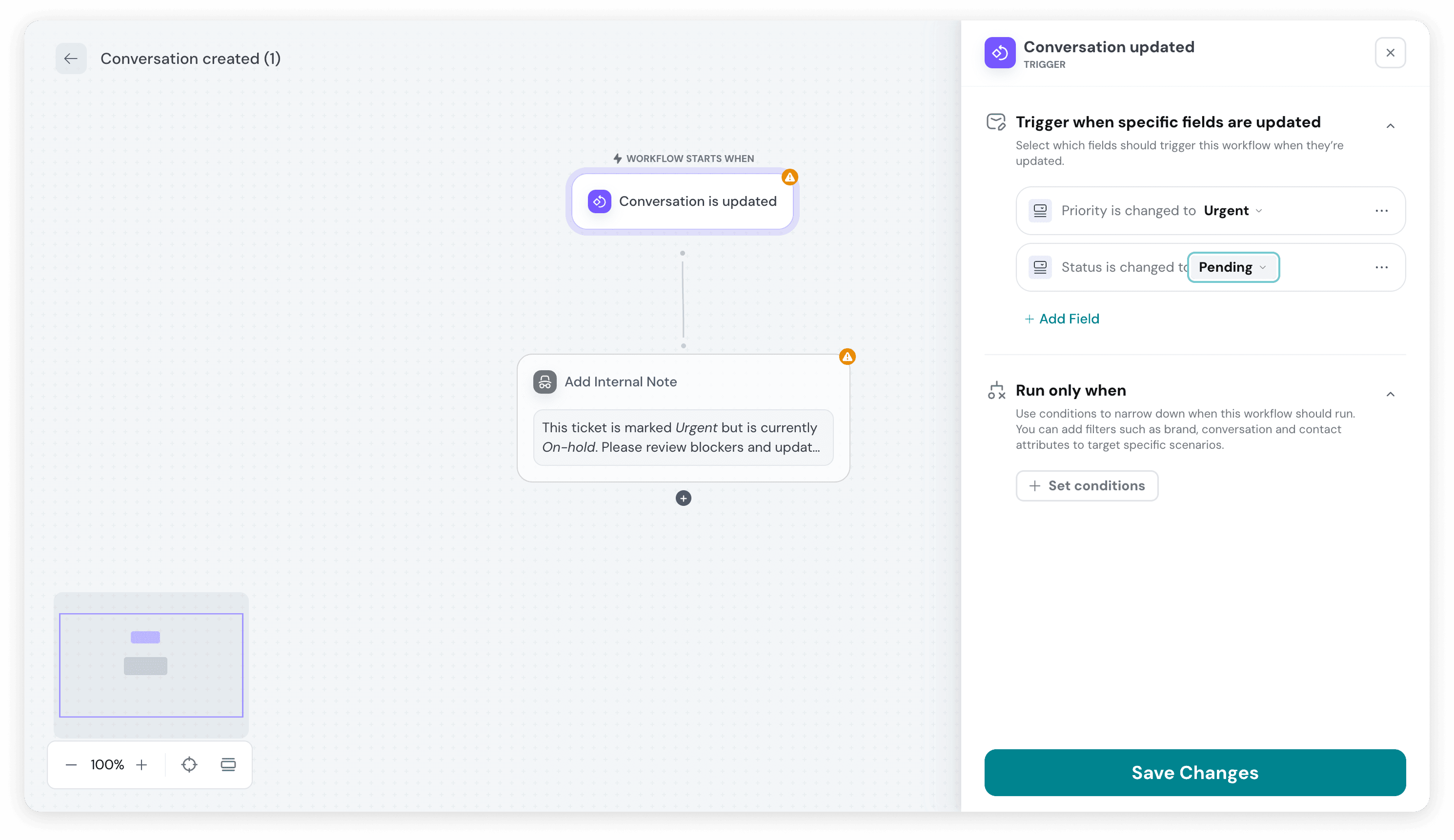
With this update, SparrowDesk now allows workflow automations to trigger when multiple conversation fields are updated, using the Conversation updated trigger.

Admins and agents can specify multiple fields as trigger conditions and define whether the automation should run when all conditions are met (AND) or when any condition is met (OR). This gives teams greater control over when workflows fire and helps avoid unnecessary or premature automation.

Why this matters

  • More precise automation – Trigger workflows only when the right combination of fields changes.
  • Reduced noise – Prevent automations from running on partial or irrelevant updates.
  • Greater flexibility – Support complex use cases without creating multiple workflows.
  • Better alignment with real processes – Automations can now mirror how conversations actually evolve.

This update makes workflow automation more powerful and predictable, enabling teams to build smarter, context-aware processes at scale.

Fixes

  • Optimized AI-based chat subject generation to produce clearer subjects in a single message.
  • Fixed an issue that prevented email content from rendering correctly and caused screen overflow.
  • Resolved macro assignment failures that could disrupt ticket workflows.
  • Fixed a macro-related issue that caused activity logs to crash in certain scenarios.
  • Resolved an issue that prevented workflow triggers from being configured for unassigned conversations.

API Changes

Restricted AI Agent configuration APIs to admin-level users to improve access control and configuration safety.

October 10, 2025

Use AI to generate the subject line for conversations

AI-based-chat-transcript

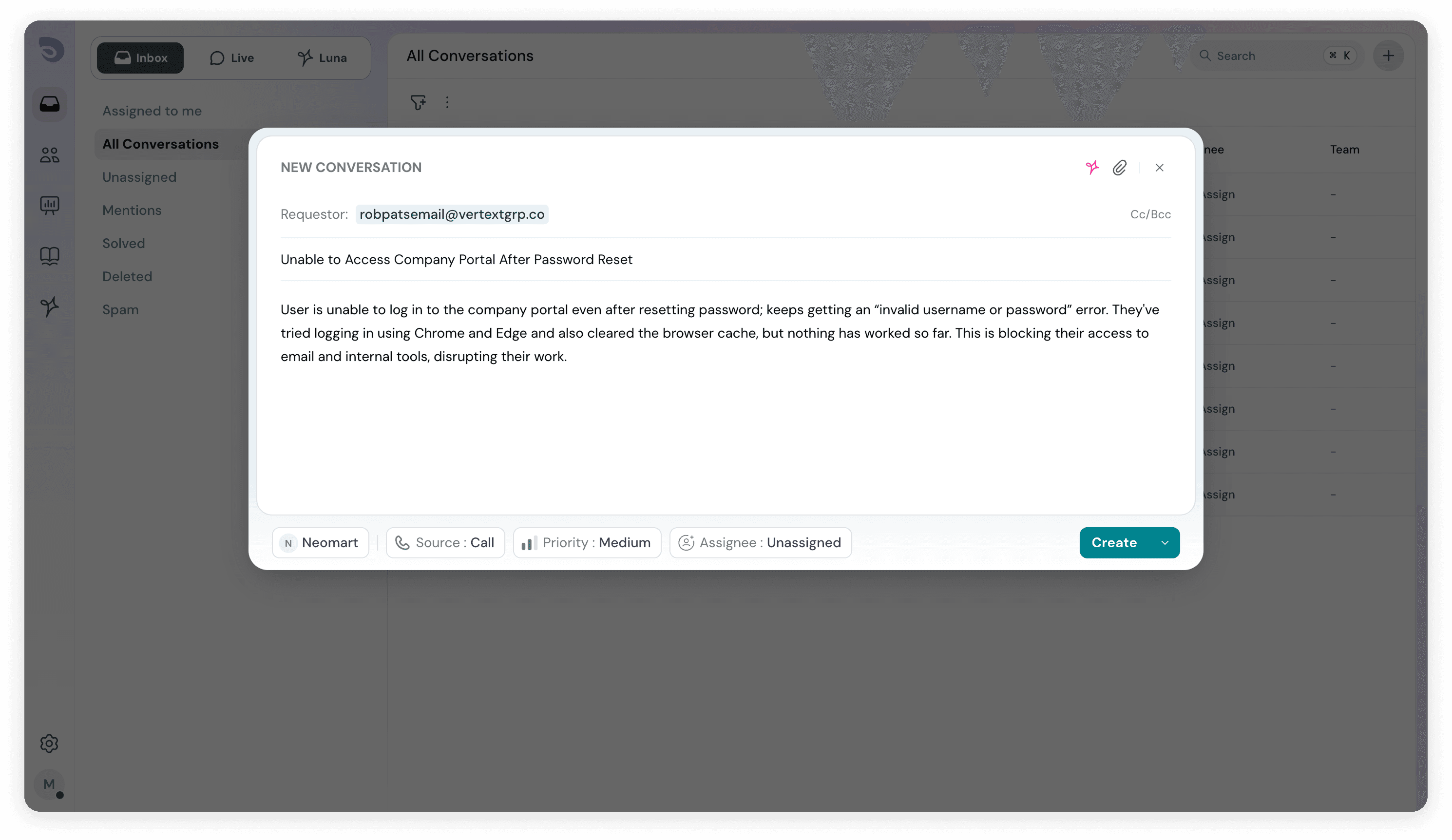
Support teams often create tickets on behalf of customers during conversations. With this update, SparrowDesk now automatically generates a relevant ticket subject using AI when an agent records an issue described by the customer.

The AI analyzes the conversation context at the time of ticket creation and generates a concise, meaningful subject that reflects the customer’s reported issue. This removes the need for agents to manually summarize or name tickets, while keeping records clear and consistent.

Why this matters

  • Clear context at creation – Tickets are accurately titled the moment they’re logged.
  • Reduced manual effort – Agents don’t have to pause and write subjects themselves.
  • Better ticket organization – Consistent, descriptive subjects improve scanning and filtering.
  • Smoother handoffs – Automatically generated subjects preserve context during reassignment or escalation.
  • Improved reporting – Well-structured subjects make issue trends easier to analyze.

This helps teams capture customer-reported issues more efficiently, keeping the ticket inbox organized and scalable as volumes grow.

Features

  • Added support for email-based filtering of contacts and requestors.

Fixes

  • Fixed an issue where chat conversation subjects did not display the requester’s full name.
  • Resolved an issue preventing source links from opening in AI-suggested replies during live chats.
  • Fixed a permission issue where agents could access tickets assigned to other users.
  • Resolved a visibility issue where team-assigned tickets were visible to non-team members.
  • Fixed workflow time input to prevent decimal values and ensure valid configurations.


October 1, 2025

View Luna AI conversations in a dedicated tab within the Inbox

Luna-conversations-in-inbox

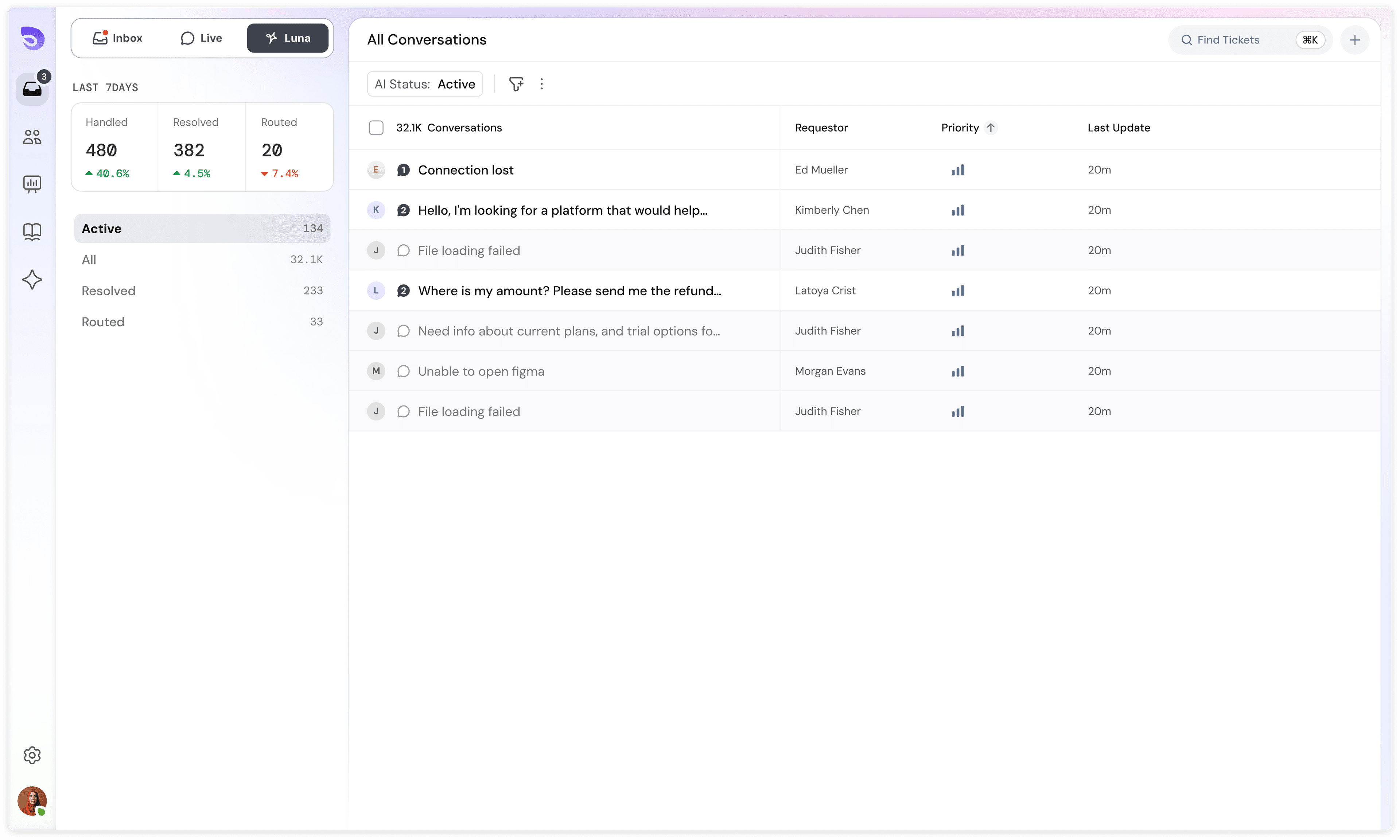
Luna AI–handled conversations are now visible in the Inbox in a dedicated tab. This gives support teams a single, unified view of all customer conversations—whether they’re resolved by AI or a human.

With this update, teams can:

  • Monitor AI activity in real time without switching views or dashboards
  • Maintain full conversation context, making it easy for agents to step in when needed
  • Audit and review AI resolutions for quality, accuracy, and training opportunities
  • Ensure nothing slips through, even when conversations are fully or partially handled by AI

This closes the gap between automation and human support, helping teams scale with AI while staying fully in control.


Improvements

  • Increased the number of search results shown in the Help Center to show all the relevant ones.

Fixes

  • Fixed an issue where login and signup validation errors were unclear or incorrect, improving authentication reliability and user onboarding.
  • Resolved a problem that prevented attachments from rendering in internal chat conversation transcripts, ensuring complete conversation history.
  • Fixed an issue where AI conversations were incorrectly triggered in live chats, restoring proper handoff between AI and human agents.
  • Resolved a UI issue that blocked workflow configuration, ensuring automations can be set up and edited without interruptions.

September 26, 2025

Send HTTP requests with variables and update conversation tags via workflows

sparrowdesk-changelog-image-workflowactions

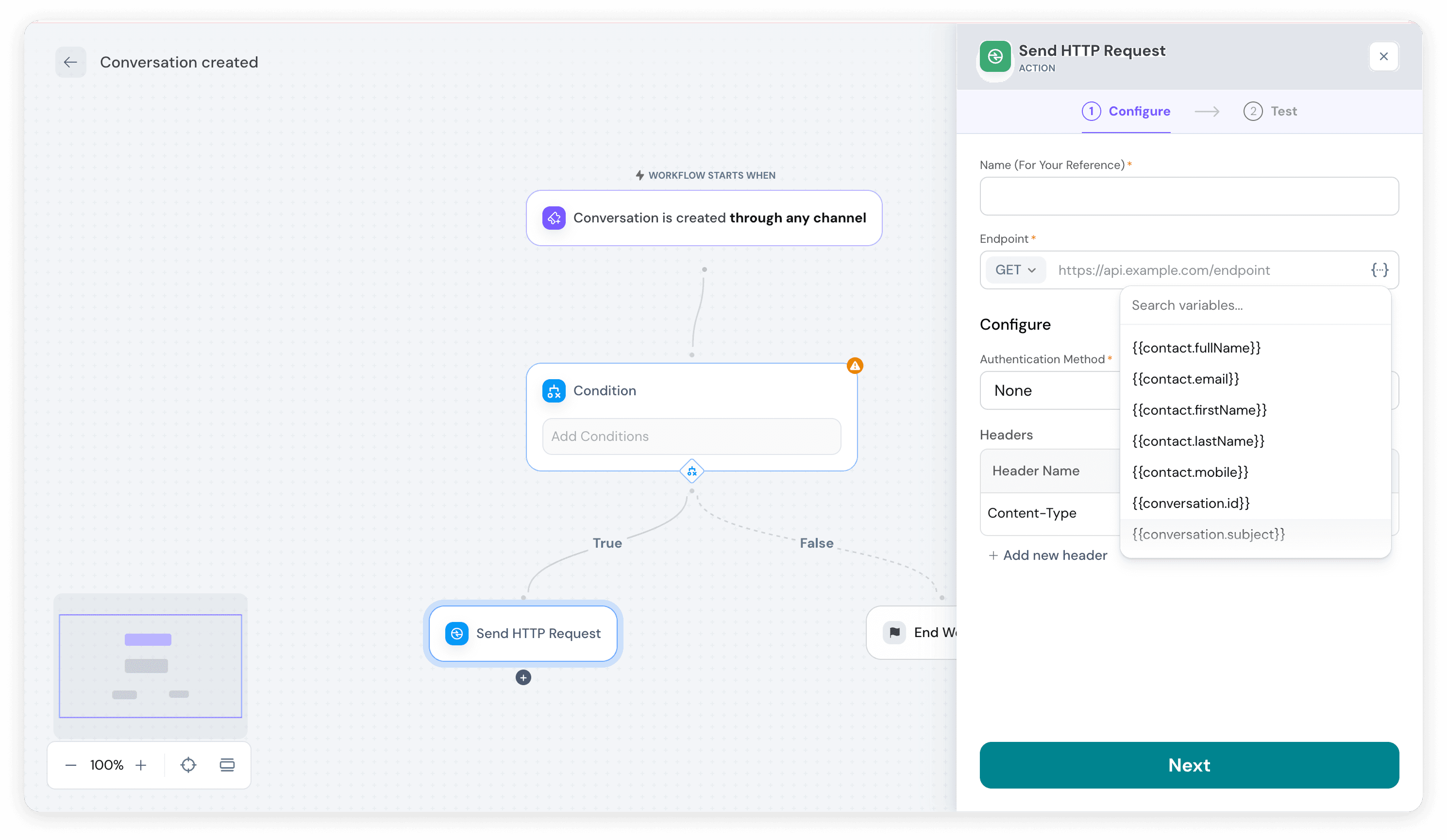
In SparrowDesk, workflows can automatically trigger actions in external tools using HTTP requests. These requests can now include variables such as contact name, conversation ID, ticket subject, or priority, allowing each request to carry specific, dynamic information.

For example, you can create a bug in Jira automatically, with all relevant details —subject, description, priority, and status— populated directly from the ticket. This makes integrations more precise, saves manual work, and ensures that external systems always receive accurate context.

In addition, workflows can now update ticket tags automatically, helping you categorize and manage conversations more efficiently as part of your automation.

Enable SSO for secure, simplified login

sparrowdesk-changelog-image-sso

SparrowDesk now supports Single Sign-On (SSO), allowing teams to log in using their existing company identity provider instead of separate SparrowDesk credentials.

With SSO, agents can access SparrowDesk using the same account they already use for work, reducing the need to manage additional usernames and passwords. This simplifies onboarding for new team members, improves security, and gives administrators better control over access.

Once configured, user authentication and logout are handled by the identity provider, ensuring consistent access management across your organization while keeping customer data secure.


Improvements

  • Chat subjects are now generated automatically using AI to summarize conversations and provide context at a glance.

Fixes

  • Fixed HTTP action workflows to correctly resolve placeholders.
  • Resolved issues with the “Assign to team” action to ensure tickets route correctly.
  • Fixed SLA reminder emails to display accurate time remaining.
  • Improved UI consistency by resolving dropdown design discrepancies across the app.
  • Corrected SLA application logic so deleted tickets no longer affect metrics.

API Changes

  • Added public APIs for creating, reading, updating, and deleting conversations, enabling programmatic conversation management.